Page 3 of 6

Re: Vehicle demo

Posted: Mon Mar 07, 2011 11:39 am
by proof
Well, GTA4 is probably using joints and even at high speeds the cars are stable and the handling is amazing because the cars can actually drift 8)

Re: Vehicle demo

Posted: Mon Mar 07, 2011 12:12 pm
by mi076
<...>

Re: Vehicle demo

Posted: Mon Mar 07, 2011 12:25 pm
by proof
I don't know how would we be able to simulate car sliding, because if you lower the friction then the car has troubles accelerating and steering (because of the lack of grip). On the other hand, increasing the friction makes the car go well but there isn't any drifting :(

Re: Vehicle demo

Posted: Mon Mar 07, 2011 7:45 pm
by proof
I was trying to use btGeneric6DofSpringConstraint to attach wheels to the chassis but it doesn't seem to work (the wheels just go their separate ways). No idea on how to configure them :cry:

Re: Vehicle demo

Posted: Tue Mar 08, 2011 12:29 am
by mi076
<...>

Re: Vehicle demo

Posted: Wed Mar 09, 2011 3:38 am
by mi076
<...>

Re: Vehicle demo

Posted: Wed Mar 09, 2011 11:03 am
by proof
Nice catch :mrgreen:
I was thinking of actually setting up friction real-time by the amount of default_friction * dot(normalize(chassis_direction), normalize(chassis_velocity)), it might work.

Re: Vehicle demo

Posted: Wed Mar 09, 2011 1:54 pm
by mi076
Nice catch :mrgreen:
I was thinking of actually setting up friction real-time by the amount of default_friction * dot(normalize(chassis_direction), normalize(chassis_velocity)), it might work.
i think provided raycast class can be taken as starting point for own class, for example you can use raycasting code and suspension code and rewrite impulse calculation for movement completely... so you will have all control, may be i shall try it little later... i found one old example (s. code in attachment) :
http://www.asawicki.info/Mirror/Car%20P ... Games.html

you can check the results with your own car :mrgreen: :
http://www.youtube.com/watch?v=trJocyjCBzo
http://www.youtube.com/watch?v=iX5ZZd_CMzs

Re: Vehicle demo

Posted: Fri Apr 22, 2011 11:43 am
by dumbo2007
ok this isnt exactly a physics issue but it concerns the rendering of the vehicle produced using btRaycastVehicle so maybe I can get some help here.

I am trying to render the car using OpenGL. The car has a chassis and 4 wheels. The chassis is simply a cuboid and the wheels are cylinders. I have their positions from Bullet as OpenGL matrices. If I pass these matrices to glMultMatrixf() in turn and push and pop matrices correctly then I do get the car rendered correctly as it moves around.

Code: Select all

//Render Ground Plane-------------------------------
	float PLANE_EXTENT = 100.0f;
	glBegin(GL_QUADS);		
		glTexCoord2f(0.0f, 1.0f); glVertex3f(-PLANE_EXTENT,  0.0f, -PLANE_EXTENT);	// Top Left Of The Texture and Quad
		glTexCoord2f(0.0f, 0.0f); glVertex3f(-PLANE_EXTENT,  0.0f,  PLANE_EXTENT);	// Bottom Left Of The Texture and Quad
		glTexCoord2f(1.0f, 0.0f); glVertex3f( PLANE_EXTENT,  0.0f,  PLANE_EXTENT);	// Bottom Right Of The Texture and Quad
		glTexCoord2f(1.0f, 1.0f); glVertex3f( PLANE_EXTENT,  0.0f, -PLANE_EXTENT);	// Top Right Of The Texture and Quad
	glEnd();

    glColor3f(1.0,0,0);
	//Render Chassis-----------------------------------
	glPushMatrix();
	glMultMatrixf(ptrShapes->m);
	glMultMatrixf(ptrShapes->childMat);	
	drawBox(ptrShapes->halfExtent[0], ptrShapes->halfExtent[1], ptrShapes->halfExtent[2]);	
	glPopMatrix();

//Render the obstructing green box
	glColor3f(0.0,1.0,0.0);
	glPushMatrix(); 
	glMultMatrixf(ptrShapes->m_box);
	drawBox(ptrShapes->box_halfExtent[0], ptrShapes->box_halfExtent[1], ptrShapes->box_halfExtent[2]);
	printf("\n box : %f, %f,%f", ptrShapes->box_halfExtent[0], ptrShapes->box_halfExtent[1], ptrShapes->box_halfExtent[2]);
	glPopMatrix();


//Render the 4 wheels    
glColor3f(1.0,1.0,0);
	
	for (int i=0; i<4; i++){
		glPushMatrix();
		switch(i){
			case 0 : glMultMatrixf(ptrShapes->m1);break;
			case 1 : glMultMatrixf(ptrShapes->m2);break;
			case 2 : glMultMatrixf(ptrShapes->m3);break;
			case 3 : glMultMatrixf(ptrShapes->m4);break;
		}

		drawCylinder(ptrShapes->radius, ptrShapes->halfHeight, ptrShapes->upAxis);
		printf("\n r : %f  ht:%f", ptrShapes->radius, ptrShapes->halfHeight);
		glPopMatrix();
	}
	

//---------------Debug code : for pink wheel-----------------------
	glColor3f(1.0,0.0,1.0);
	glPushMatrix();
	glMultMatrixf(ptrShapes->m);	
	glTranslatef(ptrShapes->m2[12] - ptrShapes->m[12], 
				 ptrShapes->m2[13] - ptrShapes->m[13], 
				 ptrShapes->m2[14] - ptrShapes->m[14]);
	drawCylinder(ptrShapes->radius, ptrShapes->halfHeight, ptrShapes->upAxis);
	glPopMatrix();
Now I am trying something different. I am trying to render one of the wheels without using glMultMatrixf(). So given the transformation matrix I am trying to simply translate the wheel into position(not bothered about orienting it at the moment). The code marked as //----debug code----- in the bottom shows this part.

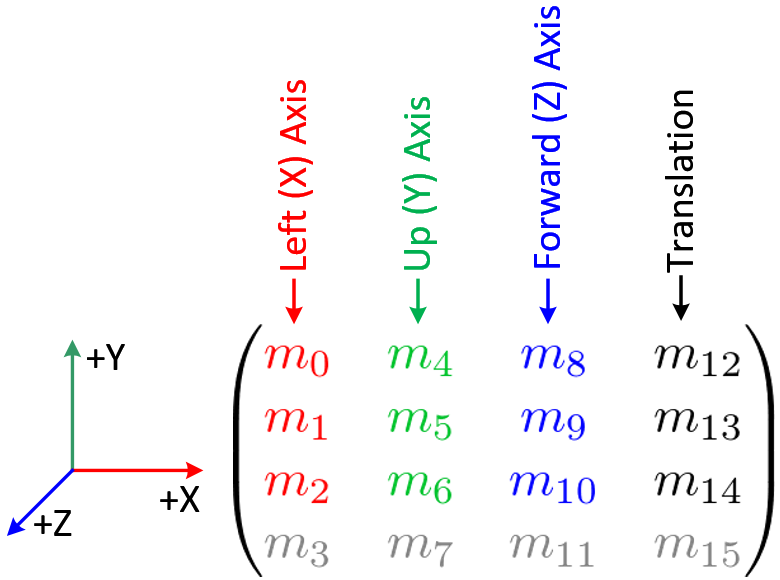
So what I have is the wheel transformation matrices in the matrices m1, m2, m3, m4. I chose one of the wheels(forward left wheel) whose matrix is in m2 and tried to use the translation elements of the matrix to translate the wheel into position. But it does not work as expected and there is a difference in the mesh positions between the wheel rendered through glMultMatrixf() and that rendered through glTranslatef(). I used the following to understand the opengl matrix format :

Image

The reason I subtract ptrShapes->m[...] from the respective x,y,z positions is because I have already translated to the position given by it using glMultMatrixf(). The postion given by m is the global position of the vehicle. Here is a video of the thing :

http://www.youtube.com/watch?v=0iATE7MVTkE


Also if I dont subtract m and directly render the wheel using m2 then I get the desired effect. Here is the code

Code: Select all

	//---------Debug code------------
	glColor3f(1.0,0.0,1.0);
	glPushMatrix();	
	glTranslatef(ptrShapes->m2[12] , 
				 ptrShapes->m2[13], 
				 ptrShapes->m2[14] );
	drawCylinder(ptrShapes->radius, ptrShapes->halfHeight, ptrShapes->upAxis);
	glPopMatrix();
Video :
http://www.youtube.com/watch?v=E0hyQjclx58

Now I cannot understand why the 2 don't match. If I have already translated to the proper vehicle position using m then if I render the wheel at the translated position with respect to the vehicle(by subtracting the translation elements of m from the translation elements of m2) I should get the same position. Obviously the rotations around the axes do not make a difference here as then I would not have got the right position by rendering at m2 directly.

I need to render the wheels using their positions with respect to the main vehicle(whose co-ordinates are in m) due to some restrictions in the API of the Orbiter Space flight simulation software in which I am trying to integrate the vehicle.

Long story short...I can only render the wheel with respect to the vehicle(whose world space coordinates are in m). So I need to get the correct co-ordinates fo the wheel with respect to the vehicle after I have been given the world space co-ordinates of both the wheel(in m2) and the vehicle(in m)

Re: Vehicle demo

Posted: Sun Jun 05, 2011 4:25 pm
by shadiq
This is nice and fantastic.

Re: Vehicle demo

Posted: Wed Jun 22, 2011 3:55 pm
by mi076
@shadiq
Thank you.

Here is an interesting tutorial (1930 !!) how differential works :)

http://www.youtube.com/watch?v=K4JhruinbWc

(you can fast forward to 1:50)

Re: Vehicle demo

Posted: Wed Jun 29, 2011 4:02 pm
by mi076
<...>

Re: Vehicle demo

Posted: Tue Jul 05, 2011 12:01 am
by proof
Looks great :o
Amazed by the new looks, however I still hate the throttle :(

Re: Vehicle demo

Posted: Tue Jul 05, 2011 10:38 am
by mi076
Thank you for looking at it... The engine implementation is very early, i have moved to custom raycast class for a while.

Re: Vehicle demo

Posted: Fri Sep 02, 2011 11:59 am
by John1789
cool... how do i get the souce code of this demo?