Page 1 of 1
Mousetrap Ball Physics
Posted: Thu Dec 29, 2005 6:54 pm
by fobsta
Hello all
I'm trying to model a real-time simulation of a Mousetrap game. The model is more or less finished and is relatively accurate (angle of surfaces etc). When I set the ball rolling it is very slow and it comes to a halt. The fps are still high on my machine (in excess of 60) so I don't think it is the complexity of the scene. Changing the mass, gravity and material properties doesn't really help. Increasing the angle of surfaces does but it destroys the physical accuracy of the modelling. The ball bearing in my simulation needs some real speed behind it. Please download and have a look at my scene.
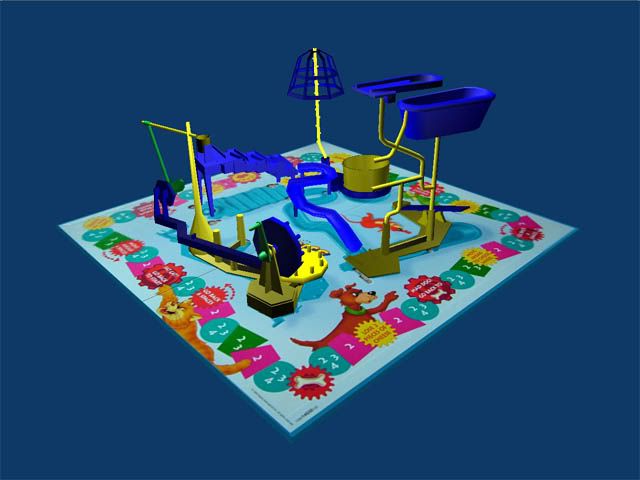 http://www.reupload.com/uploads/mouseTrap_26_test.blend
Any suggestions will much appreciated
Ball motion improvements
Posted: Fri Dec 30, 2005 1:19 am
by thinkofwhy
I've tested various parameters. You should first switch from Bullet physics to Sumo physics in the World parameters tab and maybe increase gravity a bit while you're there. Then create a material for the ball and play with the FH setting in the DYN tab (next to the RGB HSV tabs). There you should zero the friction, increase Restitution. In the logic tab, increase the ball's mass a bit, zero Damp and RotDamp, switch on the Do Fh tab to use the material settings. For the ramps, modify their material settings as well to zero friction and increase restitution. In the ramp's logic tab, make them actors and use concave mesh as their bounds. These will make the ball move faster.
However, the 2nd ramp actually goes up a bit after the first turn, and that's where the ball will stop all the time. You might have to modify that ramp a bit. And the ball never seems to gain enough momentum to really get going. So good luck.

Re: Ball motion improvements
Posted: Fri Dec 30, 2005 2:38 am
by Erwin Coumans
thinkofwhy wrote:I've tested various parameters. You should first switch from Bullet physics to Sumo physics in the World parameters tab.
Nope. Sumo is obsolete, and will be removed in one of the future releases once Bullet has been hooked up properly.
I will have a look at the scene and fix it, together with some fixing of reported Bullet bugs.
Thanks,
Erwin
fix it
Posted: Sat Dec 31, 2005 2:11 am
by thinkofwhy
I will have a look at the scene and fix it, together with some fixing of reported Bullet bugs.
Hey Erwin
, I'd like to help fix some things with Bullet also, but first, if you could explain, or give an example, of how to implement changes from the scope of Bullet up to the scope of Python methods (ie. which modules to use and how to code them in terms of inter-module sequence, if you get what I mean

). I've tried to wrap my mind around the Bullet-Blender integration (
http://www3.telus.net/BulletBlender/ble ... lasses.txt), but it's very confusing without a proper flow chart or OOP data model of the Bullet-GameEngine relationship. I'd appriciate any help in that regard.
UPDATE:

Here's an 'official', although simple, module analysis:
http://download.blender.org/documentati ... eFiles.txt
Posted: Sat Dec 31, 2005 7:47 am
by Erwin Coumans
fobsta, I had a brief look at the demo and it looks great fun!
One thing, scaling is not really supported properly, so you better apply the 'size', especially for dynamic objects.
Can you try this Blender 2.41 build, it has a few small fixes, like add/remove object support, hopefully more stable and better performance
http://www.continuousphysics.com/ftp/pu ... der241.zip
Thanks,
Erwin
Posted: Sat Dec 31, 2005 7:21 pm
by Erwin Coumans
I fixed a couple of things in Bullet-Blender integration. Hooked up the 'formfactor' (an inertia tweak), friction, restitution, and some scaling related things.
However, the rounded ramp really doesn't have a proper slope in the corner. Please try to fix the artwork, it should roll much better. Try to play with the 'formfactor' Also, you really don't need to switch off collision detection on all the other faces. It is not a performance problem.
http://www.continuousphysics.com/ftp/pu ... der241.zip
Thanks and happy new year!
Erwin
Posted: Wed Jan 04, 2006 3:19 pm
by fobsta
Hi
I've posted a reply to your suggestions here
http://www.elysiun.com/forum/viewtopic. ... 953#535953
To sum up your suggestions fixed my current problems (thank you) and so on the next.
Have you implemented a 'hinge' constraint in Bullet that I could use for the see-saw in the scene?
thanks in advance